Commodore 1541
| Commodore 1541 | |
| |
| Device Name: | 1541 |
| Manufacturer: | Commodore |
| Media Type: | 5 1/4" single-sided floppy disk |
| Storage Capacity: | 170 kB |
| Release Price: | U$ 900 |
| Released: | 1982 (1541) 1986 (1541C) 1988 (1541-II) |
| Discontinued: | 1986 (1541) 1988 (1541C) 1993 (1541-II) |
| Processor: | MOS 6502 at 1 Mhz |
| RAM: | 2 kB |
| ROM: | 16 kB |
| Data Bus: | {{{Data Bus}}} |
| Data Connector: | {{{Data Connector}}} |
| Power Requirements: | 100, 120, 220, or 240 V 50/60 Hz 25 W (30 W Max) |
| Power Connector: | IEC 60320 C13 (1541 and 1541C) 4-pin DIN (1541-II) |
| Firmware: | CBM DOS |
| License: | Proprietary |
| Manual: | {{{Manual}}} |
| Predecessor: | {{{Predecessor}}} |
| Successor: | {{{Successor}}} |
| Info: | Predecessor: VIC-1540 Successor: 1551/1570 |
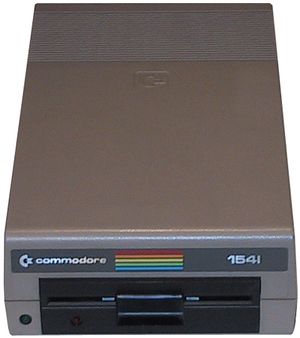
The Commodore 1541 or CBM-1541 (early models: VIC-1541 or - Germany only - VC-1541) is a floppy disk drive which uses 5.25" disks. All 1541 models use a single density drive mechanism with a single read/write head. It is connected to the serial bus via a 6-pin DIN cable to the Commodore 64. Because of the C64's long production run, the 1541 underwent a number of revisions during its life. The most notable of these are the 1541C and 1541-II, introduced in 1986 and 1988 respectively.
Features[edit | edit source]
-
 1541
1541 -
 1541C
1541C -
 1541-II


The successor of the VIC-1540 (which can only be used with the VIC-20), the 1541 was intended for use with the C64, but is also backwards compatible with the VIC-20. It is also compatible with all later Commodore 8-bit home computer models: the C128/D/DCR, C16/116 and Plus/4. However, it will be slower than the 1570/1571 on the C128, and also slower than the 1551 on the C16/C116/Plus-4 due to the 1541's slow transfer speed, so it is mainly recommended for the C64.
On the front of the case are two LEDs - a green power LED and a red one that lights when the drive is active and is controlled by the drive's firmware. When the red LED is flashing, it means that an error has occurred. The LED colors were swapped on the 1541-II and some later models.
On the rear of the case are two identical serial ports, the power switch and power connector. On the 1541-II are two DIP switches which change the device number to any number between 8 and 11 (the default is 8 on all 1541s). If only one disk drive is used, the drive number should be always kept at 8, as that is what most software is coded to use; however, if more than one drive is connected to a computer, each should get its own unique drive number in ascending order.
Hardware Revisions[edit | edit source]
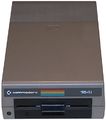
Both the 1541 and 1541C used two different drive mechanisms, one manufactured by ALPS and the other by Mitsumi/Newtronics. The ALPS mechanism is distinguished by its center-mounted and spring-loaded disk latch, which is disengaged by pushing in the latch and engaged by pulling down on the latch. This mechanism was used on earlier 1541s and some 1541Cs, but is known for alignment issues. Later 1541s and most 1541Cs use the Mitsumi/Newtronics mechanism, which uses a flip lever instead of a latch. The Mitsumi/Newtronics mechanism tends to be more reliable in normal operation, but is more susceptible to head failure due to manufacturing defects.
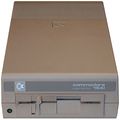
The 1541 and 1541C used an internal power supply which generated significant, often fatal, amounts of heat. This was especially an issue on early 1541s which did not have enough ventilation to dissipate excess heat, and these units had a larger motherboard which further hampered heat dissipation. Commodore rectified this issue by adding additional vents on the bottom case, though the 1541 still had a reputation for overheating. However, the 1541-II solved this issue by using an external power supply, which completely eliminated any potential thermal damage to the internal circuitry and drive mechanism. The 1541-II's external power supply uses +5V and +12V direct current, as with modern hard drives, and it is easy to solder a new plug to a power supply for an external PC hard drive enclosure and use it with a 1541-II in case its own power supply should break or be lost.
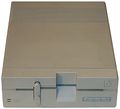
As with the original 1541, the 1541-II also used two different drive mechanisms during its production run, one manufactured by Mitsumi/Newtronics and another by Chinon. The former is mostly identical to that used in later 1541s. Though both mechanisms are largely the same in operation, the Chinon mechanism uses a direct drive motor for the spindle, as opposed to the belt-driven spindle used in the Mitsumi/Newtronics drive. This change eliminates the need to replace the drive belt and provides a more consistent disk rotation speed.
Disk Data[edit | edit source]
One side of a 1541-formatted disk has a capacity of 174,848 bytes, which is 683 blocks, but only 664 blocks are useable. The 1541 is a single-sided drive, which means that the back side of a disk can only be used by taking it out and manually flipping it over. Such a disk (sometimes called a "flippy disk") must have an additional notch in the cover opposite to the one already present, or else the back side can't be written to; disk notchers were sold especially for this purpose, but one can also use a pair of scissors and some care.
The version of Commodore DOS (2.6) built into the 1541 disk drive defines the following file formats and characteristics:
- PRG program files (can be LOADed and SAVEd directly; maximum file size loadable on C64 in default memory configuration: 202 blocks. This limit is different for other Commodore computers used with a 1541.).
- SEQ sequential files (only usable with computer applications; often used to hold text; max. file size 168,656 bytes).
- USR user files (works the same as a sequential file as far as the drive knows; usually used to mark files written in some special way the drive itself doesn't know about and that cannot be read correctly by normal software, such as GEOS files).
- REL relative files (unlike the other file types, allows a form of random access, i.e. one can't read it from beginning to end but one can directly access data in the middle of the file; only usable with computer applications; max. file size 167,132 bytes with max. 65,535 data sets).
- DEL deleted files (with hints or manipulation of the directory this file type can be viewed).
- If the < char is printed after the file format, this means the file cannot be overwritten. It is write-protected by software.
- If the * char is printed before the file format, this means the file wasn't properly closed. To delete such a "corpse", use the DOS command VALIDATE!
- There can only be a single directory of files per disk, with no sub-directories.
- The maximum number of files in the directory of one disk is 144.
Although the actual decoding and reading of disk data into the drive's own internal RAM happens much faster, the data transfer rate between the drive and the computer is limited to the very low value of about 300 bytes per second. It can be made much higher by using a fast loader (up to about 10 kilobytes per second).
The version number of Commodore DOS among all 1541 models is version 2.6, but the BIOS ROMs for the 1541C and 1541-II nevertheless fix some important bugs. Although not officially supported by Commodore, the ROM code from the 1541-II (but not that from the 1541-C) can be burned onto a pair of EPROMs and used in the original 1541 model if the user desires.
Technical Details[edit | edit source]


- Chips: MOS Technology 6502 (CPU) with ca. 1 MHz, 2x VIA MOS Technology 6522
- RAM: 2 KByte (4x 2114)
- ROM: 16 KByte; type numbers:
- 1541-1:
- 325302-01 (DOS V2.6 LoROM $C000-$DFFF),
- 901229-XX (DOS V2.6 HiROM $E000-$FFFF)
- 1541-C:
- 251968-01 (DOS V2.6 $C000-$FFFF)
- 1541-2:
- 251968-03 (DOS V2.6 $C000-$FFFF)
- 1541-1:
- Interfaces: serial bus
- Total capacity: 174,848 bytes per disk
- Sequential files: 168,656 bytes per disk
- Relative files: 167,132 bytes per disk, 65,535 records per file
- Entries of a directory: 144 per disk
- Sectors per track: 17 to 21 depending on zone. Outer tracks had more sectors than inner tracks.
- Tracks: 35. Access to tracks up to 40 or 41 is physically possible, but the standard DOS doesn't use them for data storage. Some copy protection schemes and non-standard DOS versions do use them.
- Blocks (also known as sectors): 683 (664 blocks free). The 19 sectors on track 18 are reserved to directory (sectors 1 through 17) and metadata (sector 0).
- Dimensions:
- 97 × 200 × 374 mm (3.8 × 7.8 × 14.7 inches)
- 77 × 184 × 256 mm (1541-II)
- Weight:
- 5 kg (11 lb)
- 1.5 kg (3.31 lb, 1541-II; without power supply)
- Current supply: 100, 120, 220 or 240 V with 50 or 60 Hz, depending on which region the drive was originally sold in
- Power input: 25 W
Disk Drive Commands[edit | edit source]
The 1541 is controlled using a number of drive commands. The digit zero after the drive command letter in those commands is not strictly necessary, but its use is recommended to avoid triggering an obscure bug (see REPLACE) on 1541-I drives.
- Format a disk (NEW)
OPEN 1,8,15,"N0:Diskname,ID": CLOSE 1- or:
OPEN 1,8,15: PRINT#1,"N0:Diskname,ID": CLOSE 1 - The disk name has a maximum of 16 chars and the ID requires 2 chars.
- Reset drive (RESET)
- Error channel reports the drive DOS version after reset
OPEN 1,8,15,"UI0":CLOSE 1- Initialize drive (INITIALIZE)
- Re-reads BAM and resets error status
OPEN 1,8,15,"I0":CLOSE 1- Validate a disk (VALIDATE)
- Checks and fixes the disk's meta-data structures (directory, block availability map, etc.)
OPEN 1,8,15,"V0": CLOSE 1- Copy files (COPY)
OPEN 1,8,15,"C0:NewFile=OldFile": CLOSE 1- Copy disk (COPY)
OPEN 1,8,15,"C0=C1": CLOSE 1- Copy the whole disk on a double drive from drive 1 to drive 0.
- Concatenate files (COMBINE)
OPEN 1,8,15,"C0:NewFile=OldFile1,OldFile2,...": CLOSE 1- The command string is limited to 40 chars in length!
- Rename a file (RENAME)
OPEN 1,8,15,"R0:New_Name=Old_Name":CLOSE 1- The command string is limited to 40 chars in length!
- Delete a file (SCRATCH)
OPEN 1,8,15,"S0:filename": CLOSE 1- Wildcards such as * (matches all the remaining chars) or ? (matches one char) are supported.
- For example:
OPEN 1,8,15,"S0:*":CLOSE 1all files of a disk will be deleted ("scratched"). - With comma (,) more than one file or wildcard mask can be given and multiple matching files actually could be subject of the deletion.
- Overwrite a file (REPLACE)
SAVE"@0:filename",8- The REPLACE command has a bug that can in certain circumstances corrupt data on disk. This can happen quite easily on an original 1541, but even on later drives (1541-II and up), which have supposedly been "fixed" by Commodore, the bug can happen under certain conditions. See REPLACE for details. Better use SCRATCH then SAVE to be on the safe side.
- Position (P)
PRINT#file#, "P" CHR$(channel#) CHR$(rec#lo) CHR$(rec#hi) CHR$(position)- The POSITION command requires using an opened Relative file, and must be used before beginning a read or write operation. The command string is followed by three or four characters. The first is the channel number, matching the secondary channel number found in the OPEN command. The following two characters denote the record position, with the least significant digit being first. The optional fourth character is the position within the given record.
- Memory Write (M-W)
OPEN 15,8,15: PRINT#15,"M-W";CHR$(LowAddress);CHR$(HighAddress);CHR$(Size): PRINT#15,String:close 15- Writes to the floppy's internal memory.
- These VIC-20 and C64 BASIC commands can be used with the disk drive: CLOSE, GET#, INPUT#, LOAD, OPEN, PRINT#, SAVE and VERIFY and the status variable ST. On later computers, additional commands and status variables are available.
Hints[edit | edit source]
- Activate VIC-20 backwards compatibility mode for the 1541 (operates like the VIC-1540 drive, slightly faster, incompatible with C64 unless the screen is blanked):
OPEN 15,8,15,"UI-":CLOSE 15 - Reactivate default C64 mode for the 1541:
OPEN 15,8,15,"UI+":CLOSE 15
- Device number (8…15) can be changed temporarily by software with:
OPEN 15,8,15:PRINT#15,"M-W";CHR$(119);CHR$(0);CHR$(2);CHR$(device number+32)+CHR$(device number+64):CLOSE 15
- The device number (8…11) can be changed permanently by hardware using DIP switches (1-2 or A-B) on the 1541-II:
| Device number |
DIP-1/A | DIP-2/B |
|---|---|---|
| 8 | on | on |
| 9 | off | on |
| 10 | on | off |
| 11 | off | off |
| top: on - bottom: off | ||
- On original 1541 models and the 1541C, which do not have device select switches, the device number can be set by manipulating the terminal tag. The terminal tags are known as "device jumpers" on the board of the disk drive.
- By default, bad sectors cause a drive head bump. Enable a bit to prevent the knocking (which would otherwise affect alignment of the head.)
OPEN 15,8,15: PRINT#15,"M-W";CHR$(106);CHR$(0);CHR$(1);CHR$(113):CLOSE 15
Content of the test-/demo diskette[edit | edit source]


Side 1:
13  HOW TO USE        PRG (engl. instruction 1.part)
5   HOW TO USE TWO    PRG (engl. instruction 2.part)
1   C-64 WEDGE        PRG (Utility Starter C64)
4   VIC-20 WEDGE      PRG (Utility Starter for VIC-20)
4   DOS 5.1           PRG (Utility Main Program)
11  COPY/ALL          PRG (Copy Program)
9   PRINTER TEST      PRG (Printer Test)
4   DISK ADDR CHANGE  PRG (Change device number by software)
4   DIR               PRG (Easier using of disk commands)
6   VIEW BAM          PRG (BAM Viewer)
4   CHECK DISK        PRG (Diskcheck with VALIDATE)
14  DISPLAY T&S       PRG (Block Viewer in Decimal or Hexadecimal)
9   PERFORMANCE TEST  PRG (Floppy Check)
5   SEQUENTIAL FILE   PRG (Program example for SEQ-files)
13  RANDOM FILE       PRG (Program example for special DOS-Commands)
558 BLOCKS FREE
Note that the content of the test/demo disk can change slightly depending on the year of construction or model.
Disk Image Format[edit | edit source]
Disks for the 1541 disk drive are represented by the D64 disk image format. These disk images are used to transmit entire disks for use with emulators and mass storage devices.
Links[edit | edit source]

|
Wikipedia: Commodore_1541 |
- Inside Commodore DOS by Richard Immers and Gerald G. Neufeld (PDF)
- Firmware (ROMs) for the disk drives 1540, 1541, 1541C and 1541-II at zimmers.net
- Different ROM versions 1541-c000.325302-01-02-03-05-06AA at Forum64.de

- 1541 tricks at commodore64.se

- Test-/Demo Disk of different Commodore disk drives at zimmers.net
- Demodiskette with "Back to Nature" and "Piano" at Forum64.de


- Literature
- Book of VC-1541
- VIC-1541 Single Drive Floppy Disk User's Manual, Commodore Computer (PDF)
- 1541: The floppy disk by Ruud Baltissen.
- ROM-Listing at AAY64
- Floppy documents at C64-Online :
